DecoLife

GAMING PC IN KOREA

Gaming PC in Korea: current parts list and buying guide

Game performance varies by settings and environment. This guide shows the CPU, graphics card, memory, SSD, motherboard, power, and cooling recorded for the current product instead of presenting an unverified performance claim.

Quick answer

What to check first

Choose a target resolution and the games you play, then compare the CPU and GPU together. Confirm that memory, SSD, motherboard, power supply, cooling, and case support the complete system.

Selection guide

What to check in a gaming PC configuration

  1. 01

    CPU

    Check whether it balances with the graphics card for the games and background tasks you use.

  2. 02

    Graphics card

    Choose it according to monitor resolution, game requirements, and graphics-memory needs.

  3. 03

    Memory and SSD

    Confirm capacity for installed games and multitasking, plus whether later expansion is possible.

  4. 04

    Motherboard, power, and cooling

    Verify chipset, power capacity, cooling, and case compatibility for the complete parts list.

Current product

This section shows the currently listed configuration and price rather than an invented performance claim.

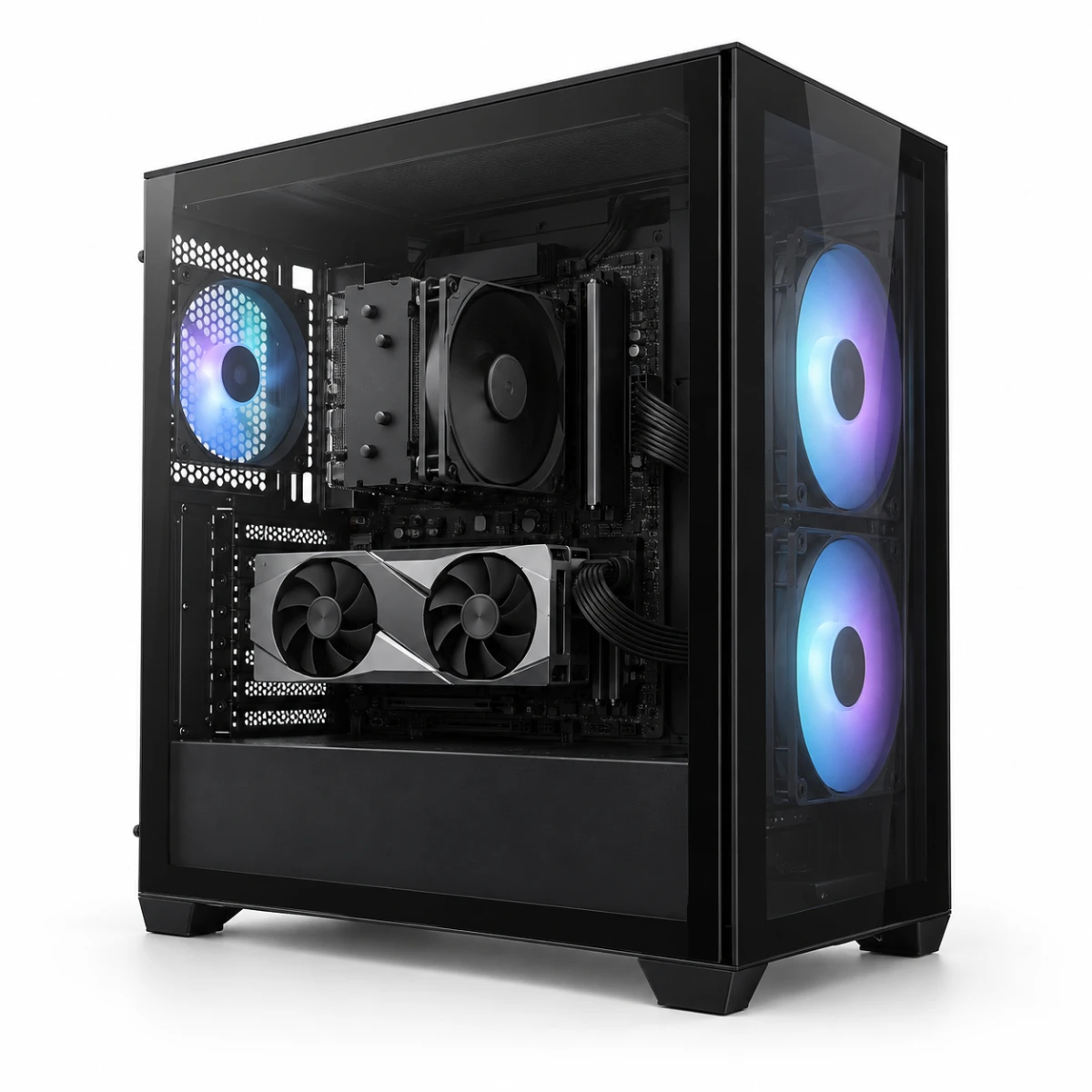
Main image of Decolife Gaming PC DGP-0001

Custom PCs · DecoLife

Decolife Gaming PC DGP-0001

Black gaming PC with Ryzen 5 7500F and MSI RTX 5060 Ti 8GB

Current listed price

1,760,400원

Checked 2026-08-28

Current listed specifications

CPU
AMD Ryzen 5 7500F
Graphics card
MSI GeForce RTX 5060 Ti VENTUS 2X OC PLUS 8GB
Motherboard
MSI PRO B650M-P
Memory
ESSENCORE KLEVV DDR5 16GB 5600
SSD
ADATA LEGEND 860 500GB
Case
darkFlash DS500 RGB black mid-tower case
Power supply
ABKO Coremax CM-700B ETA Bronze 700W
CPU cooler
OTH CV-420 black

FAQ

Frequently asked questions

Essential information to check before purchasing.

What PC should I buy if I play both PUBG and League of Legends?

Choose for PUBG, the more demanding game, and for your monitor. The listed Ryzen 5 7500F and RTX 5060 Ti system has a separate FHD PUBG estimate, while a lower-cost system may be enough if you mainly play League of Legends.

Can I run Discord and YouTube while gaming?

Yes, but they reduce CPU and memory headroom. The listed system has 16GB DDR5; consider whether a 32GB dual-channel option is available if you frequently use Discord and a browser or plan to record or stream.

What PC specifications do I need for a 144Hz monitor?

A 144Hz monitor does not make every game run at 144 FPS. Check the expected FPS for your game, resolution, and preset, then verify that the monitor port and cable support 144Hz and that the refresh rate is selected in Windows.

Is the graphics card the only part that matters for a gaming PC?

No. The CPU, memory, power supply, cooling, and motherboard affect performance and stability. CPU-heavy games and high-refresh play can also depend on CPU and memory configuration.

Should I choose 16GB or 32GB of memory for gaming?

16GB can handle many games when used alone. Choose 32GB dual-channel for more headroom with large games, Discord, a browser, recording, or streaming, and check each game's current recommended requirements.

Is a 500GB SSD too small for several games?

It can fill quickly after Windows, applications, and several large games. Add the current install sizes of your planned games and leave room for updates before deciding on 1TB or an additional SSD.

Are the game FPS figures direct DecoLife measurements?

No. They are conservative reference ranges derived from an external benchmark using the same CPU and GPU, with the differences from the current listed configuration disclosed.

When was the price checked?

When available, the product page shows its price-check date. Recheck the displayed price and complete parts list immediately before payment.

Can I change individual components before ordering?

This page describes the currently listed complete system. Do not assume substitutions are available; confirm any configuration change through the purchase channel before paying.

Questions by game

Estimated performance by game

Each range states the external benchmark source and differences from the current listed product. It is not a direct measurement or guarantee.

View all game questions

PUBG: BATTLEGROUNDS

What PC should I buy for PUBG at 144 FPS?

At FHD, competitive settings can target high-refresh-rate play, while Ultra can suit a 144Hz-class monitor. These are conservative reference ranges, not guaranteed measurements; map, player count, and memory configuration affect actual performance.

FHD (1920×1080) · Very Low / competitiveFHD (1920×1080) · Ultra
View more

Fortnite

What PC specifications do I need for Fortnite?

Performance Mode suits high-refresh competitive play, while Epic settings can target a 120Hz-or-higher experience at FHD. Results vary with seasonal updates and rendering mode.

FHD (1920×1080) · Performance ModeFHD (1920×1080) · Epic
View more

People also ask these game-specific questions